SQL Server Files, Drives, and “Performance”

Last night after our monthly PSSUG meeting our presenter Jason Brimhall found himself waiting for a cab at Microsoft’s Malvern PA Office. Having waited for a taxi in Philly’s suburbs before I felt bad for his wait that might not end so I took it on myself to offer him a ride to the airport Marriot. On the drive I took it upon myself to ask his opinion on different strategies for allocating database files in SQL Server. This is a topic I find myself drawn to and I welcome the opportunities to hear other people’s (especially a Microsoft Certified Master’s) opinion on the subject.

I tend to find myself drawn to a simple approach that increases the number of files proportional to the size of the database. I admit that this is a matter of convenience and portability that has its limits. While Microsoft publishes some file numbers as the maximum (4,294,967,295) and the number above which issues may occur (50,000), a much lower number of files will tend to practical depending on needs. In one case I have encountered I found that at about 200GB I struggled to get reasonable copy and move speeds even with ESEUTIL. This was of course a single site scenario with fiber channel SAN as target and destination. Other scenarios require much smaller file sizes as well as other tools for copying (XCOPY, ROBOCOPY). Copies over a WAN (should be over a VPN\VLAN, but that is a different discussion Sebastian Meine could comment on as a segway to his presentation on new security roles in SQL Server)… copies over a WAN will traverse network segments of varying speeds, few if any of which will ever approach the throughput of fiber SAN. In these cases it is a matter of balancing the need for a manageable number of files and folders and keeping files small enough to copy. But for each of these cases it is important to note that the performance is being measured on the dimensions of speed of database file copy and file manageability (as an intersection of scripting for file and folder creation and the flexibility of the physical data model to make use of files), these are not frequently dimension of performance that our users notice.

Jason pointed out that from the point of view of user any significant query slowness will be perceived as an outage, and was a point added to his case against the separation of data and indexes into separate files specifically relevant to cases of piecemeal file based recovery. Our discussion started with my asking him his opinion on the comparative merits of creating separate database files for each processor (core) vs. using IO affinity masks to delegating IO related processing to a specific processor. I feel it important to note that some NUMA systems have separate IO channels for each NUMA node in which case IO affinity would deprive those member processors those channels (I think). Jason was supportive of allocating files per processor in the more general case. He mentioned that it wasn’t necessary (or always possible) to have separate disks for these files to realize performance.

What are you thoughts?

Are you familiar with the proportional fill algorithm?

What do you think about the impact of using solid state local disk in tempdb in 2012 FCI? or tiered storage?

Proportional fill reading:

http://sqlserver-performance-tuning.net/?p=2552

http://www.patrickkeisler.com/2013/03/t-sql-tuesday-40-proportional-fill.html

http://technet.microsoft.com/en-us/library/ms187087(v=SQL.105).aspx


Kiwi Puts Its All-Purpose Wearable Up For Pre-Order, Aims To Be Everything To Everyone

Now your talking about wearables. Hype all you want about smart watches that only work with certain phones, but things like this (and perhaps cufflinks), and Martian Commander watches are what are going to make the difference. The new Mac Pro may be a revolution in design, that transforms a desktop computer into an objet d’art, but I doubt I could find a matching pair of shoes if someone called it a hat.

New Year’s Resolutions

Like so many people I indulge in the tradition of casting off my inhibitions in preparation for casting off my bad habits as far into the New Year as can be predicted. At the very least I am going to attempt to take on or renew some good habits.

I am going to blog.
I am going to budget.
I am going to eat right.
I am going to exercise.
I am going to find ways to shoehorn SQL or NoSQL into each of those things.

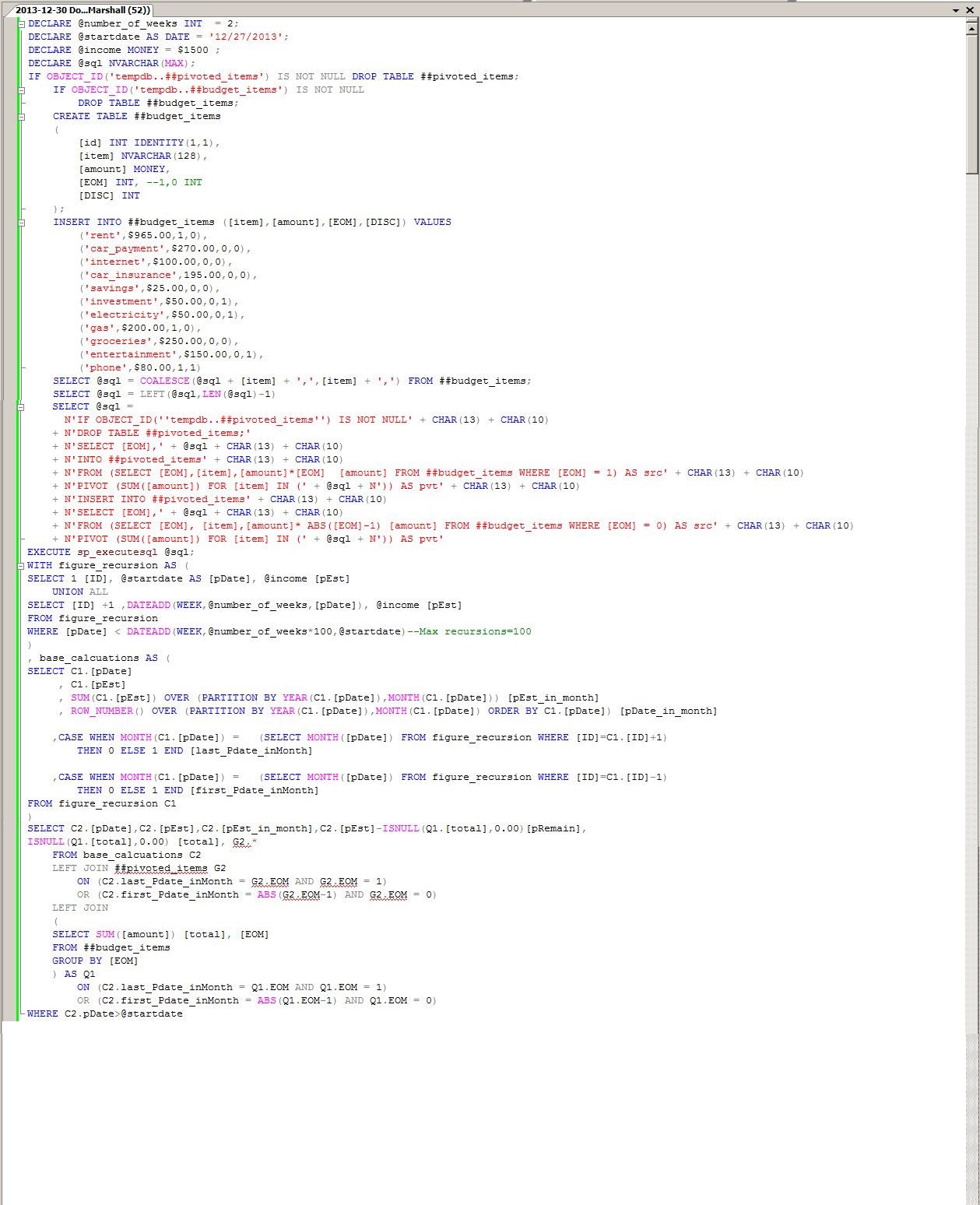
It is to the effect of accomplishing the first, second, and fifth of these I am writing this post.

2013-12-30 Budget SQL Part01

I bought this book from this guy who made a puzzle I was busy to solve, and now I think I know everything

In my last post I discussed one of my favorite new features in SQL Server OVER the last few versions. I also capitalized an entire word as if I were shouting it at you. REST assured that there is more method() than madness in this. In this CASE (stop please) I was alluding to the introduction of window functions and the OVER clause.

DATEADD(HOUR,DATEDIFF(HOUR,GETUTCDATE(),GETDATE()),GETDATE())

There were a number of things brought into SQL Server OVER the past few versions that tickle me in such a way as to beg the question Why haven’t we been doing that all along? One of these I only gave a brief glance when I first saw it, much to my detriment. Datetimeoffset is a positively marvelous datatype. Not only does it allow us to store date and time values together with a precision of as little as 100 nano-seconds, but it can also be used to determine if two datetimeoffset values match across time zones with zero coded date math.

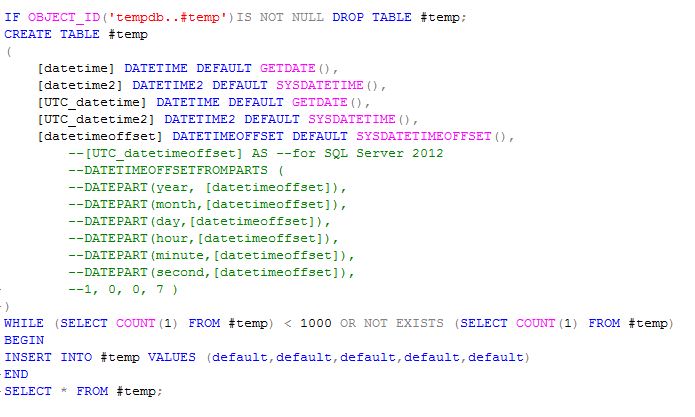
Unfortunately, only the latest version of SQL Server contains the DATETIMEOFFSETFROMPARTS. I say this is unfortunate because I am writing this from a SQL 2008 R2 machine, and the example that follows could be much more demonstrative the time zone sensitivity of the datetimeoffset data type if I hadn’t commented that code out. Nevertheless, let’s look at some comparison of datetime types.

2013-26-12 comparing some date values

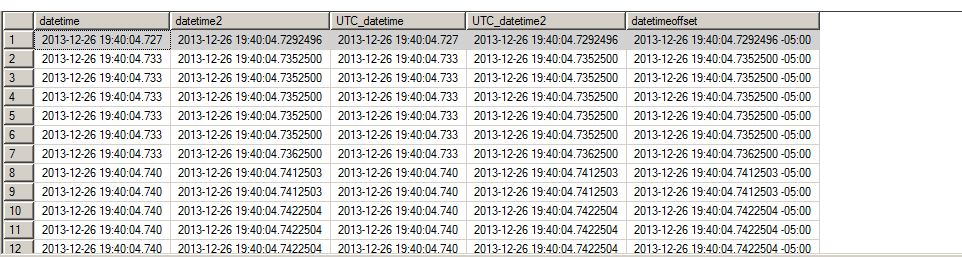
If we look at the output we can see the differences in the precision of the different datatypes. We can also see the time zone component to the datetimeoffset type. The standard date time data type cuts its digits off at the milliseconds’ place. This can be somewhat misleading in appearance. We’ll look at that later. But first let’s look at how fast these rows being written. We can also see from this result set that even at 100 nanoseconds precision we really can’t count on more precise time to uniqueify our rows. Perhaps, in a later post we’ll discuss TIMESTAMPS.

2013-26-12 comparing some date values output

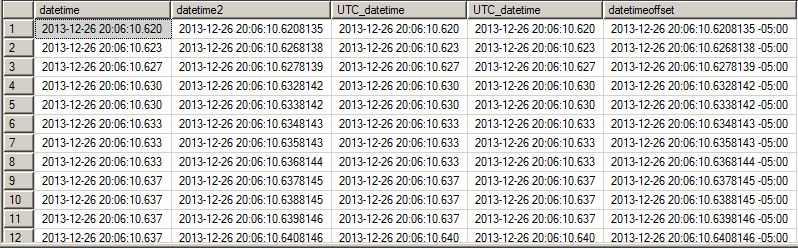
If we look closer at these values we’ll notice something. The right most digit in each and every value is limited to just a few numbers. In the case of the datetime values, I have come to understand that we can actually only capture 1/300th of a second as opposed to 1/1000th. As for the more precise data types it is unfortunate that in addition to leaving my SQL 2012 instance at work, I left my Cesium clock at the gym. That of course means, that I lack the tools to accurately determine how many nano-seconds precision we are realizing with our ability to store 100-nanoseconds.

2013-26-12 comparing some date values output more closely

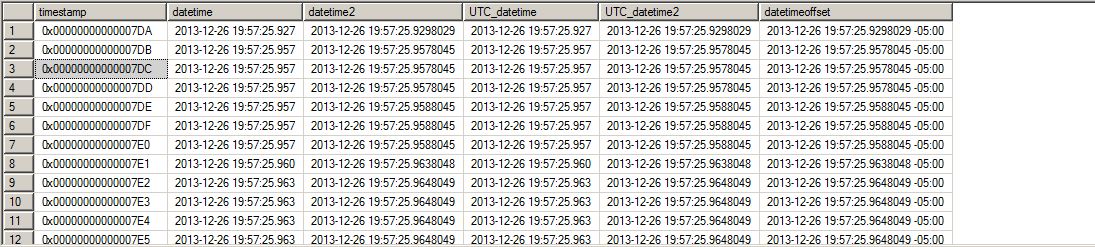
Its getting close to 2013-12-26 20:30:10.6208135 -05:00 and I am trying to keep these posts short and too the point, in that meandering way that whets your whistle for more (I hope). Speaking of whetting your whistle, look at this version of the above with a TIMESTAMP, which is not to be confused with a TIMESTAMP.

2013-26-12 whet your whistle for a timestamp article